AEOS Integration
The AEOS integration connects VisitorPass to Nedap AEOS. It runs as a Windows service on your AEOS server, and keeps a connection open to VisitorPass.
Capabilities
| Capability | What it does | Needed by |
|---|---|---|
| Visitor Provisioning | Gives every visitor a carrier in AEOS, valid for the visit, holding a badge and the authorisation templates the visit grants | Installations where visitors are registered in VisitorPass |
| Door Opening | Opens a door when a visitor uses their phone. The integration presents the visitor's badge on a door reader, and AEOS decides | Most installations |
| Credential Issued | Invites people created in AEOS to VisitorPass, and records their consent and badge in AEOS once they have accepted | Installations where people are created in AEOS |
A carrier reaches AEOS in one of two ways. With Visitor Provisioning, VisitorPass creates it. With Credential Issued, it is created in AEOS, and VisitorPass adds the badge once the person has accepted. Door Opening works with either, since AEOS only opens a door for a badge a carrier holds.
An organisation uses Visitor Provisioning or Credential Issued, not both. A person invited through Credential Issued would otherwise also be given a visitor carrier with the same badge.
Network Requirements
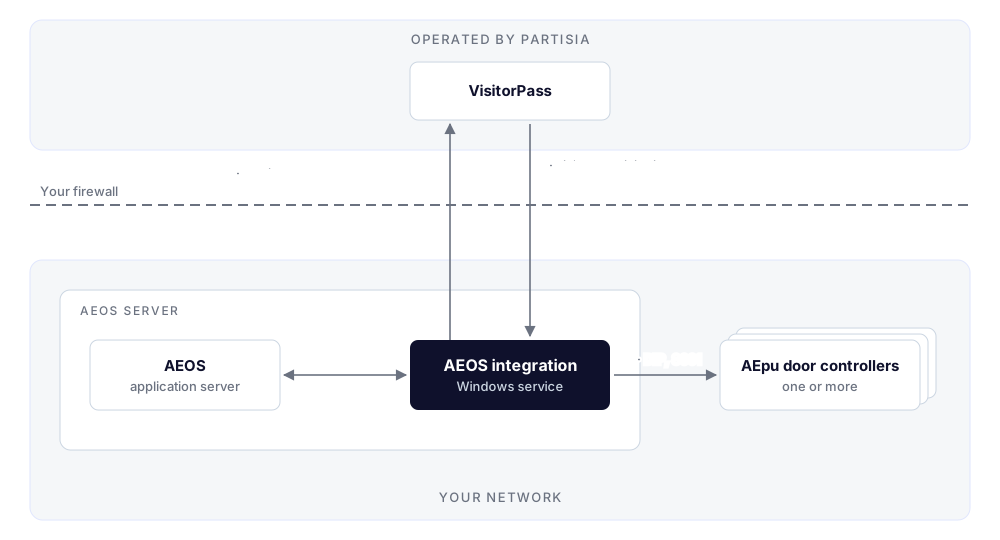
| # | From | To | Port | Protocol | Needed for |
|---|---|---|---|---|---|
| 1 | AEOS server | Each AEpu door controller | TCP 8001 | Nedap DIP | Door Opening |
| 2 | AEOS server | VisitorPass (visitorpass.partisia.com) |
TCP 443 | HTTPS | Every capability |
| 3 | VisitorPass (visitorpass.partisia.com) |
AEOS server | TCP 8888 | HTTPS | Optional — only for Credential Issued |
To set them up:
- Allow outbound HTTPS (TCP 443) from the AEOS server to
visitorpass.partisia.com, including WebSocket connections. - For Door Opening, allow TCP 8001 from the AEOS server to each AEpu door controller. If a controller sits behind its own router or 4G modem, set up a port forward to TCP 8001 on that modem.
- For Credential Issued, make sure TCP 8888 is free on the AEOS server, forward it from your public
address to the AEOS server, and allow it in the firewall from
visitorpass.partisia.com. Tell Partisia the public address it is forwarded from. - Give Partisia remote access to the AEOS server for installation, for example TeamViewer.
Notes:
- The integration talks to AEOS on the same server, over port 8443.
- It uses only the AEOS SOAP web service. It never connects to the AEOS database, so it needs no database login and no access to the database server.
- It can also run on its own Windows host next to the AEOS server, as long as the connections above hold.
- Connections 1 and 2 stay open permanently and send heartbeats. Firewalls, proxies and modems should not close idle sessions on them.
- Connection 3 is encrypted with a certificate Partisia issues for the AEOS server's host name.
What's Next
- Install the AEOS Integration: the service itself.
- Visitor Provisioning: carriers for visitors registered in VisitorPass.
- Door Opening: the AEpu door controllers and the doors.
- Credential Issued: inviting employees and recording consent.
- Operate the AEOS Integration: checking the service, restarting, upgrading and troubleshooting.
- Deployment Overview: what you supply so we can bring your organisation onto the service.