Introduction
VisitorPass issues a verifiable credential to the people who come to your sites — someone arriving for a single meeting, a group attending a course, a sub-contractor working on site for six months. That credential checks them in on arrival, opens the doors they are authorised for, and leaves a record of who was on site and when — without a paper logbook, a queue at a desk, or a per-visit identity check to pay for.
It is delivered as a service. Partisia runs it; you connect it to the identity, calendar and access control systems you already have.
A Visit, End to End
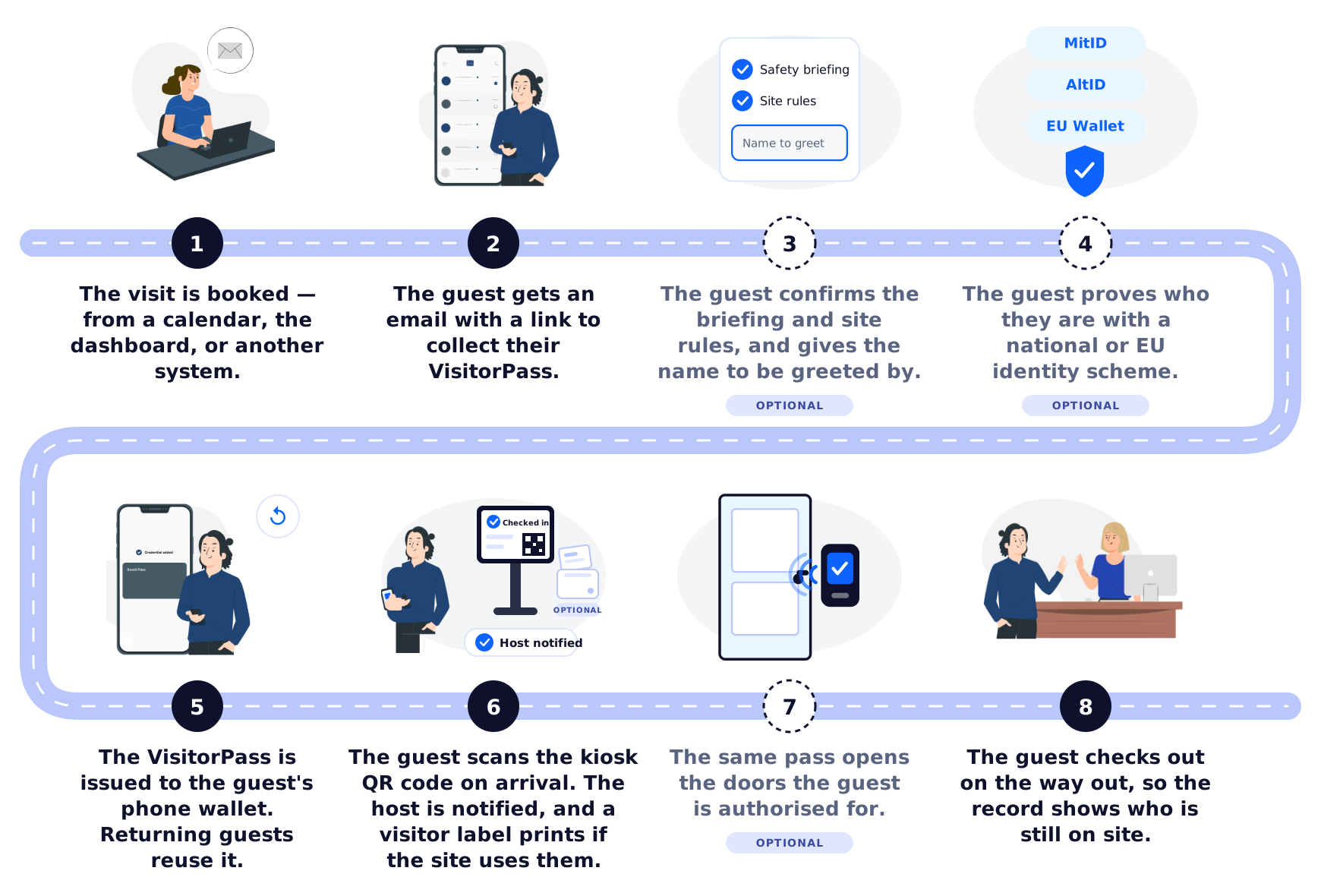
Steps 3 to 8 happen on the guest's own phone. Nobody has to type anything on the guest's behalf, and no identity document changes hands — which is why a site with no one on the front desk works just as well as one with a staffed reception.
Step by step, with the ideas each one introduces:
- A visit is what VisitorPass works in: one guest, expected somewhere, for a period. It can begin from a calendar invitation, from the dashboard, or from another system through the invitation API — an HR system, a contractor register, or the access control system itself — so nobody enters the same person twice.
- A guest never gets an account. The mail carries a personal link and that is the whole of their setup. Someone who already holds a VisitorPass can ignore it; the one they have still works.
- A visitor template is the definition of one kind of visit. It settles three things: what the guest must complete beforehand, such as acknowledging a site briefing; whether they must prove who they are; and which areas the visit opens. That is why a contractor and a meeting guest are asked different things and let into different places.
- Proving identity is separate from being invited. Where the visit's template calls for it, the guest authenticates against a national or European scheme. VisitorPass keeps the fact that this succeeded, and which scheme was used — not the document behind it.
- The pass is a verifiable credential — the guest's identity, held on their own phone. It is a signed statement they can present, and anyone can check it without contacting whoever issued it. It identifies the person, not the appointment, which is why one pass serves every future visit rather than being spent on this one. Issuance is the gate: it is only ever handed out to a guest who was invited, acknowledged whatever the visit required, and proved who they are if that was asked.
- The kiosk is the screen a guest checks in on — at a desk if you have one, by the door if you do not. Check-in matches the presented address to a visit happening now, within a buffer either side of the booked window. No match — wrong day, wrong site, a walk-in — means no check-in: the guest is shown whatever help instruction you have set, and the attempt is recorded rather than lost. The host, the employee expecting them, is told they have arrived. A site that wants guests visibly badged can connect a printer to the kiosk, and check-in prints a label.
- Doors stay under your control. Your access control system holds the authorisations and makes every decision. VisitorPass provisions the guest into it before the visit, with the access profile their template calls for, and withdraws them afterwards.
- Checking out is what makes the register mean anything. It closes the visit, so at any moment the record separates who has left from who is still inside.
An Hour, or a Season
VisitorPass calls everyone it issues a credential to a guest, and a visit is the period they are expected. Both stretch further than the words suggest, and the difference between the two shapes is the length of the window rather than anything mechanical.
Short visits — a meeting, an interview, a course, a delivery. These usually start life as a calendar invitation: someone invites an external guest and copies the monitored mailbox, and the visit registers itself without anyone doing anything they were not already doing.
Long engagements — temporary staff, sub-contractors, maintenance crews, consultants, auditors: anyone with reason to come and go over weeks or months. These rarely begin in a calendar. They are created in the dashboard, where the visit's window is simply set to the length of the engagement rather than the length of a meeting. Where another system already knows about the engagement — an HR system, a contractor register, the access control system itself — it can create them over the invitation API instead, so nobody types the same thing twice.
Either way, every visit carries a visitor template, and that is where one kind of visitor is distinguished from another. A template settles three things: what this sort of person must complete before a credential is issued, whether they must prove who they are, and the access profile they are given — which areas they may enter, and so which doors their credential opens.
Someone coming to a meeting might only have to give the name they should be greeted by, and only ever need the entrance floor. A contractor might have to confirm they have read the site safety briefing and the site rules, and then be admitted to the plant itself. Templates are managed in the dashboard, one of them is the default for visits arriving from the calendar, and templates you no longer use are archived rather than deleted.
Everything after that is identical. The same credential, the same check-in, the same doors, the same record. A sub-contractor checks in each morning with the credential they were issued on their first day, and it stops working when the engagement ends — nothing to hand back at the gate, and nothing left active because somebody forgot to collect it.
Two things simply matter more the longer the window gets. Knowing who the person really is becomes worth the extra step, which is what the identity verification below is for. And access control integration stops being optional, because someone on site for a season needs doors rather than an escort.
The Credential Is Standard, So the Wallet Is the Guest's Choice
The VisitorPass credential is an ordinary verifiable credential. It follows the same standards as everything else Partisia issues — the W3C Verifiable Credentials data model, SD-JWT for selective disclosure, OpenID4VCI for issuance and OpenID4VP for presentation.
That matters for the guest. Any wallet implementing those standards can hold a VisitorPass, so a guest who already carries one does not install anything. Guests who do not have a wallet can use the Partisia ID Wallet, and organisations that want the pass to appear under their own brand can ship a white-label wallet.
This is also why VisitorPass gets easier over time rather than harder. Under eIDAS 2.0, EU member states are introducing European Digital Identity Wallets, and organisations will be expected to accept them. Those wallets speak the same protocols VisitorPass already uses, so as they reach people's phones, more guests arrive already holding a wallet that works.
Knowing Who The Guest Is
The identity in a VisitorPass is, by default, one the guest asserted themselves: an invitation reached them, and they collected the pass. For many visits that is enough.
Where it is not — a hospital, a utility, a construction site, anywhere subject to NIS2 — VisitorPass can require the guest to prove their identity with a national or European scheme before a credential is ever issued: MitID or AltID in Denmark, and EU Digital Identity Wallets as they become available. The credential is then bound to a verified person rather than a self-asserted address, and the audit trail records a documented link between a real identity and every door that opened.
Whether to require it is set on the visitor template, so it can apply to contractors and not to meeting guests.
What VisitorPass Is Not
Two boundaries are worth stating up front, because they determine what stays yours.
It does not replace your identity provider. Federating your own provider is the arrangement to want in production: your staff sign in with the accounts they already have, your directory stays the single place a person is created and removed, provisioning and multi-factor authentication stay yours, and VisitorPass never sees a password. But it is integration work, and you should not have to do it before you know whether you want the product — so accounts can be held for you instead, with nothing to set up.
It is not an access control system. It supplies and withdraws the credentials your access control system recognises, and tells it when a guest presents one at a door. That system keeps the authorisations, the access decision and its own audit trail. Nothing about who may open which door moves into VisitorPass.
Licensing
VisitorPass is licensed on its own, and there is nothing to buy from the rest of this documentation site to use it. Please get in touch to discuss terms.
What's Next
- Technical Architecture: the systems VisitorPass connects to, what crosses each boundary, and what the credential contains.
- Deployment Overview: what you supply so we can bring your organisation onto the service.