Technical Architecture
VisitorPass is delivered as a service by default: Partisia operates it, and each customer organisation is a separate tenant within it. It can also be run on your own infrastructure, which changes who operates the components but none of the boundaries described here.
What matters architecturally, therefore, is not what runs where — it is what VisitorPass connects to on your side, and what crosses each of those boundaries.
There are seven such connections. The guest's inbox and wallet, and a device at each entrance, are always present; the other four are chosen per organisation.
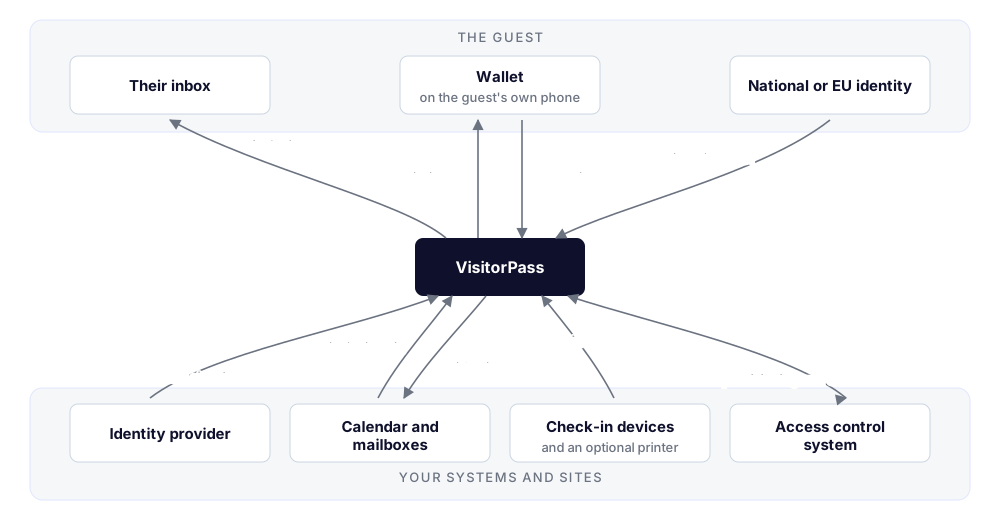
| Connection | What crosses it |
|---|---|
| The guest's inbox | Out: one invitation, carrying the link that collects the pass |
| The guest's wallet | A credential is issued to it, and presented from it at a kiosk or a door |
| Your identity provider | A staff member's verified email address and display name, at sign-in |
| Your calendar and mailboxes | In: calendar invitations. Out: arrival notifications to your hosts |
| Your check-in devices | Check-in and check-out from a browser at the entrance; an optional label |
| A national or EU identity scheme | Proof of a guest's identity, before a credential is issued |
| Your access control system | Guests provisioned and withdrawn; door events reported |
The Guest's Wallet
The wallet is the guest's own, on their own phone, and is not operated by anyone in the deployment. It reaches Partisia over the public internet. It never needs access to your network and is never on it.
The credential is an identity, not a ticket. It identifies the guest, and it is issued only once the visit's controls have been satisfied — the guest was invited, they acknowledged whatever their template required, and they proved their identity where that was demanded. Holding one is therefore also evidence that those checks were passed.
The line it draws is between identity and visit. What identifies the guest travels with them; everything a visit means — the host, the meeting, the site, the period — stays in the visit record. Today the identifying part is a single value, the guest's email address. That is deliberate, and it has three consequences:
- The credential is reusable. One credential works for every visit that guest is invited to, at any organisation using VisitorPass. Returning guests skip issuance entirely.
- It discloses nothing about your site if presented elsewhere. A credential naming a meeting would disclose that meeting to anyone who could induce a presentation.
- Visit details never leave VisitorPass. Who is meeting whom, and why, stays in the service and in your dashboard, governed by the roles there.
Where a guest's identity has been verified against a national or EU scheme, that verification is recorded against the visit.
Your Identity Provider
There are two arrangements, and they differ only in where staff accounts live.
Accounts held by Partisia. Nothing to connect. The accounts and their credentials live in the identity broker Partisia operates. This is the quickest way to get people signing in, and it is what most organisations use while they are evaluating VisitorPass.
Your own provider, federated. VisitorPass brokers your provider rather than replacing it: your provider authenticates the person, VisitorPass issues the session, and the verified email address is matched to an employee record. Supported federation covers OpenID Connect and OAuth 2.0, SAML 2.0, and LDAP or Active Directory. Provisioning, deprovisioning and multi-factor authentication stay entirely with you, and VisitorPass never sees a password.
The second is the arrangement to reach for in production, and not because of the sign-in screen: it is what keeps your directory the single place a person is created and — more to the point — removed. Someone who leaves your organisation loses their VisitorPass access at the same moment they lose everything else, without anyone remembering to do it.
Moving from the first arrangement to the second later is possible. Plan it with us, so that accounts line up by email address and nobody loses their history.
Mail and Calendar
Two independent things happen here.
Invitations in. Partisia monitors a mailbox of its own and gives your organisation an address on
it — visitorpass+your_organization_name@partisia.com. When someone invites an external guest to a
meeting and copies that address, the invitation becomes a visit. Each message is checked before it
is accepted: it must be addressed to the monitored address, it must pass SPF and DKIM, and the
sender's domain must belong to a known organisation. Mail failing any of these is recorded for review rather than
acted on. Cancellations withdraw the visit.
Note which way this runs. VisitorPass does not reach into your mail system and has no credentials for it; your calendar sends to an address we operate, exactly as it would to any other attendee. Nothing about your mail platform constrains this.
Deployments that create visits from the dashboard or the invitation API do not need this at all.
Notifications out. Both the guest's invitation and the host's arrival notification are sent by Partisia's own mail service. Nothing is sent through your mail system: there is nothing to configure, and no credentials to hand over.
The difference that matters is where each one lands. Mail to a guest goes straight to them and never touches your systems at all. Mail to a host arrives in your mailboxes like any other inbound mail — from a Partisia sender rather than one of your own addresses, so it is worth allowing through spam filtering.
A National or EU Identity Scheme
Where a visit's template requires proof of identity before a credential is issued, the guest completes a verification against a national or European scheme — MitID or AltID in Denmark, European Digital Identity Wallets as they arrive.
VisitorPass records that the verification succeeded and against which scheme. It does not retain the underlying identity document or the attributes the scheme returned beyond what the organisation has configured it to keep.
Your Access Control System
This is the connection that turns a visitor register into physical access, and it is where the ownership boundary matters most.
Your access control system remains the authority. It holds the authorisations, the schedules and the anti-passback rules; it makes every access decision; and every access appears in its own audit log, attributed to the guest. Nothing about who may open which door moves into VisitorPass.
Against that, VisitorPass does two distinct things:
- It provisions guests into your access control system ahead of a visit, and withdraws them afterwards. By the time the guest arrives, they already exist there with the right authorisations for the right period: the period comes from the visit, and the authorisations from the access profile on the visitor's template, so a contractor and a meeting guest are provisioned differently without anyone deciding it per visit. Where the system can record it, the outcome — including a guest's documented consent — is written back.
- It reports a credential presented at a door as an event on the corresponding reader, in the form that system already understands. VisitorPass says this guest presented at this door; your system decides whether it opens.
An integration component sits between the two and speaks both protocols. It is specific to the access control product; the two interfaces it uses on the VisitorPass side — the invitation API and credential events — are not. Supporting another product means another integration component, and nothing above it changes.
Your Check-In Devices
Each entrance where guests arrive has a device showing the check-in screen — a tablet or a small screen with a browser is typical. An administrator enrols it from the dashboard, which produces a link and a code; opening that link on the device pairs it. Nothing is installed on the device, and an unenrolled device cannot check anyone in.
The connection is outbound only. The device reaches the service the way any browser does, it does not need to reach your access control system, and nothing needs to reach it.
Where guests should wear a badge, a printer attached to that device prints a label at check-in. Whether labels are printed at all is a single organisation-wide setting — every guest, or none — and the label carries the guest's name, who they are visiting, and the time.
Arrival
"Happening now" allows a buffer either side of the booked window, so an early or delayed guest still checks in cleanly. Where several visits could match, the one starting closest to the current time wins. Check-out follows the same path and closes the most recent open arrival.
A guest with no matching visit — the wrong day, the wrong site, a walk-in — is not checked in. The kiosk shows the help instruction you have configured, and the attempt is recorded, so your dashboard shows it rather than losing it.
Running It Yourself
VisitorPass can also be operated on your own infrastructure, in which case the components behind the service — the application and its database, the credential issuer and verifier, and the identity broker — run under your control. That changes who operates them, not any of the boundaries described above, and it is documented separately.
What's Next
- Deployment Overview: what you supply so we can bring your organisation onto the service.